
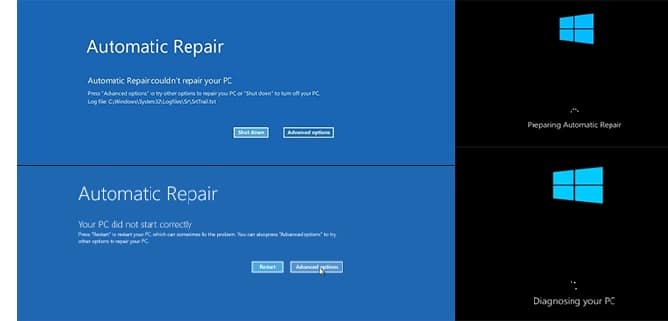
When this happen computer usual symptoms are when it start everything seems normal trying to load but then instead of going to desktop it start coming up with ” repairing ” with circle on screen. Then after few seconds or minutes shows some error code with blue screen that what we are referring to blue screen.Blue screen is very common with all computers, it is important to know it can be due to hardware issues or software rare cases can be due to both hardware and software mix of both lets say example would be fault on hardware cause bluescreen but then multiple of blue screen restarts ended up causing file corruption or damage on system files resulting in hardware and software both.
When blue screen happens most of times they are clear as blue screen stats on screen with error other times computer keep restarting quick with blue screen error hard to read.
Lets say most common 0x0000000A,0x000000D1,0x0000001E,0x000000EF error codes which indicates different fault and reasons. Some can be fixed with SFC system files scans, other may require hardware replacement in case of fault hardware like ram memory or solid state drive SSD, faulty video card and many more.
And this applied to all models like Nitro, Predator, swift series even not listed here applicable to all.
I have written some of reasons below which can be tried to remedy boot issues and this solutions will only work if problem is software related like forced incompatible driver from windows update, system files corruption. It will not work or solve hardware related issue.
1: The “reset / hard reset button” (Press Pinhole on back / side)
Many Acer laptops swift, predator, nitro get “stuck in boot loop” due to static or bios issues.
- Turn laptop upside down or look around on sides some models have tiny hole
- Use paper clip insert through hole and hold for 5-10 seconds that does hard reset and release any static, possible bios issues, stuck in update issues
- After pin hole reset, press power button if laptop works again it has done the job if not then different treatment is needed
- Technician’s Observation: This fixes many laptops lets say about 25% of Acer boot loops instantly.
2: Repair from system restore in Recovery Mode
- Many of times when laptop goes to repair options after it fails automatic repair .
- When it get to repair options, click on Advance Options > Then system restore
- Click on restore it should comes up with backup dates available choose the restore date and proceed
- If restore is success and provided no underlying hardware issues laptop should boot into desktop
- Technician’s Observation: This restore method will only fix fault if underlying issue is not hardware, and also note sometimes restore point is not available because backup was disable or never successful .
- Additional Bitlocker /Encryption key requirement. Laptops which have encryption activated / bit locker you will be asked for 48digit encryption key to unlock disk before you are unable to restore it or see options if this is case bit locker key backup can be found on your Microsoft account associated with laptop user email address it can be access through
Find the recovery key in your Microsoft accountIf the BitLocker recovery key is backed up to your Microsoft account, follow these steps to retrieve it:
- From another device, open a web browser and go to https://aka.ms/myrecoverykey
3: Scan for SSD Failure
SSD or solid state drive can be partially faulty, or deteriorated over times unable to read and write efficiently, it can be very obvious sometimes in very beginning computer comes with SMART status check indicating hardware failure.
- If it has not come up with hardware failure error it is worth running system scan to rule out SSD faliure .
- Similar procedure after laptop gets to repair options click on CMD, command and type powershell “get-physicaldisk | format-table -autosize
- Technician Advice: At this stage, don’t keep trying in case disk is failing in workshop environment we can still use tools like pc-3000 data recovery equipment to backup data
4: SFC system files Scan, Bootrec rebulid
SFC system file scan with CMD is also a powerful tool to rectify system files issues
- In repair options choose CMD command
- Run Command one by one :
sfc /scannowand press Enter.sfc /scannow /offbootdir=C:\ /offwindir=C:\Windowschkdsk C: /f /rDISM /Image:C:\ /Cleanup-Image /RestoreHealth
bootrec /fixmbrbootrec /rebuildbcd- This can run system file check scan and rectify any faults
When to Stop Troubleshooting and Visit our Lab
- The BIOS says “HDD: None” or Disk not found or operating system not found: This means your motherboard unable to see or talk to storage which also means it can not load / start any windows operating system files at all in this case you will not see any blue screen at all.
- You have tried all software related issue above : If you have already tried software issues above then likely fault is hardware this needs further testing for fault
When to stop troubleshooting and visit our workshop.
You have tried all software related issue above : If you have already tried software issues above then likely fault is hardware this needs further testing for fault. Even if you have not tried all we can handle all work software and hardware
We will figure out exactly what’s wrong.
Frequently Asked Questions (FAQ)
Why is my Acer computer stuck in a boot loop?
Many reasons hardware and software i have listed some of software easy fixes above, if those does not work computer needs to be checked in workshop.
What is the first thing I should try to fix an Acer boot loop?
First easiest of all switch laptop off completely hold power button for 10 seconds that will cut off power completely then start again failing to work after this try few f software solutions above.
My computer is not going into recovery options after failed automatic repair?
Yes it can happen on some model, during widows load up hold power button for few seconds it will interrupt normal start up of windows and after 2 attempts it should go to repair mode and recovery environment options .
Will fixing the boot loop erase my personal data?
Not always but depending on fault if software related issue data should be safe, in case of system restore it only restore computer to chosen date it removed application / program but personal data remains untouched but in case of hardware fault like failing SSD data situation needs to be checked carefully .

About Bilal
Bilal Tahir is a certified technician with over 20 years of experience in computer hardware repair and IT services. He holds an NVQ Level 4 qualification in Electronics along with industry recognised certifications including Microsoft Certified Systems Engineer (MCSE, 2006) certification number 8A522B-26C1CX and Cisco Certified Network Associate (CCNA). Bilal began his career as a Network Administrator where he developed strong expertise in managing and maintaining IT systems and networks. Over time, he developed a deep interest in hardware repairs particularly component level diagnostics and repair electronics which led him to specialize in advanced motherboard and device level troubleshooting. He has worked across all major laptop and computer brands providing precise reliable repairs. With a strong technical foundation and hands on experience, Bilal is known for delivering high quality solutions for both individuals and businesses.
Write a Comment