Asus ROG Keyboard Replacement
By Bilal / ASUS ROG / 0 Comments

ASUS Republic of Gamers (ROG) is a well-known brand among gamers, known for producing high-quality gaming equipment, including keyboards. While ASUS ROG keyboards are built to provide an exceptional gaming experience, users may encounter various issues with their keyboards. In this article, we’ll discuss some common ASUS ROG keyboard issues and how to fix them.

Here are some signs and symptoms that could indicate a problem with your Asus ROG keyboard:

Unresponsive keys: This refers to keys on the keyboard that don’t register when you press them, resulting in no characters typed on the screen. Various reasons, such as a hardware malfunction, a loose connection, or a software issue, can cause it.

Sticky keys: This occurs when the keys on the keyboard feel sticky or slow to press and release. It can be due to debris or dust buildup underneath the keys or a damaged mechanism in the key switch.

Repeating keys: When you press a key once, it types multiple characters. It happened because of a sticky key or a mechanical problem with the key switch.

Missing keys: Some keys may be physically missing from the keyboard, making it impossible to type certain characters: accidental damage, wear and tear, or a manufacturing defect.

Unusual characters: This refers to when you press a key, but it types a different letter than you intended. A software issue, a language setting, or a problem with the key switch can cause it.

Keyboard back-light not working: If your keyboard has a back-light, it may not turn on or flicker. It could be due to a faulty back-light or a keyboard wiring problem.

Keyboard cable issues: The cable connecting the keyboard to the computer may be loose or damaged, causing connection problems. It can result in unresponsive keys, missing characters, or repeated characters.

Keys are sticking: This is when the keys on the keyboard feel physically stuck or difficult to press, making it difficult to type. It happened because of debris or dust buildup under the keys or a problem with the key switch.

Not working: This refers to when the keyboard is not typing when pressing any keys. A hardware malfunction or a software issue can cause this.

Own typing: It occurs when the keyboard starts typing without any keys pressed. It can be due to a software issue or a keyboard wiring problem.


There are several common causes of ASUS ROG Keyboard issues, including:

Physical damage: This could be caused by dropping or hitting the laptop, resulting in damaged or disconnected components.

Hardware issues: Faulty keyboard components or loose connections can cause problems with the keyboard.

Driver issues: If there are problems with the drivers that control the keyboard, this can result in issues with key registration or backlighting.

Software issues: Certain software programs or malware infections can cause keyboard problems, such as unresponsive keys or unwanted characters.

Dust and debris: Over time, dust and debris can accumulate under the keyboard keys, making them unresponsive or sticky.

Water damage: Spilling liquid on the keyboard can cause a short circuit or corrosion of the keyboard components, resulting in various keyboard problems.

Wear and tear: Continuous use can cause wear and slash on the keyboard, resulting in unresponsive or sticky keys or malfunctioning back-lighting.

Cable issues: The cable that connects the keyboard to the laptop’s motherboard can become loose or damaged, resulting in connection issues and keyboard problems.

Battery issues: Low battery power can cause the keyboard to malfunction or become unresponsive.


To take care of your ASUS ROG keyboard and avoid frequent repairs, here are some tips:

Keep liquids away from your laptop: Accidental spills commonly cause keyboard damage. Keep liquids, such as water and coffee, away from your computer.

Clean regularly: Regular cleaning of your laptop keyboard can prevent the accumulation of dirt, dust, and debris that can lead to sticky or unresponsive keys. Use a can of compressed air to blow out any dirt and debris that’s trapped under the keys.

Be gentle: Avoid pressing too hard on the keys, as this can cause damage to the keyboard. Also, be careful when removing keycaps to avoid damaging the key switch underneath.

Use a protective cover: Consider using a keyboard protective cover to keep your keyboard clean and prevent spills from reaching the keys.

Avoid extreme temperatures: Exposure to extreme temperatures can cause damage to your laptop keyboard. Avoid using your laptop in very hot or very cold environments.


ASUS ROG Keyboard Issue: Why PC Fix London?

PC Fix London is a trusted and reliable repair centre specialising in repairing ASUS ROG keyboards. Here are some reasons why you should choose PC Fix London for your ASUS ROG keyboard repair:

Experienced technicians: PC Fix London has a team of highly skilled and certified technicians who have years of experience in repairing ASUS ROG keyboards.

Quality service: We use only high-quality replacement parts to ensure that your ASUS ROG keyboard works and is new after the repair.

Quick turnaround time: We understand that time is crucial, so we offer fast turnaround times and aim to repair your ASUS ROG keyboard as quickly as possible.

Competitive pricing: We offer the highly competitive and best pricing for our ASUS ROG keyboard repair services without compromising on quality, and it is no fix; no fee is guaranteed.

Warranty: All our repairs come with a warranty, so you can have peace of mind knowing that your ASUS ROG keyboard is covered.

Diagnosis: We do comprehensive diagnosis services for your ASUS ROG keyboard to identify the issue before proceeding with the repair.

Convenient location: Our repair centre is conveniently located in London, making it easy to drop off your ASUS ROG keyboard for repair.

If you’re experiencing keyboard issues with your Asus ROG laptop or any other computer problems, don’t hesitate to get in touch with PC Fix London. Our team of experts is ready to help you get your computer running smoothly again. Call us now at 020 7018 7490 or email us at contact@pcfixlondon.com to schedule an appointment or get a quote or bring to workshop.

Warning:

Please note that the guideline instructions provided may not always apply to the symptoms your computer is experiencing. Sometimes, symptoms or behavior can be the same, but the underlying reason or fault can be completely different.

The fastest way we can assist customers is by bringing computers to our workshop, where technicians have the tools to diagnose faults accurately. After checks, if parts are found to be faulty or damaged, we proceed to replace them with high-quality original parts.

No appointments are required; you can drop off your computer at our workshop during working hours.

If you have more queries about our laptop repair and upgrade services, please feel free to contact us at 020 7018 7490 or email us at contact@pcfixlondon.com
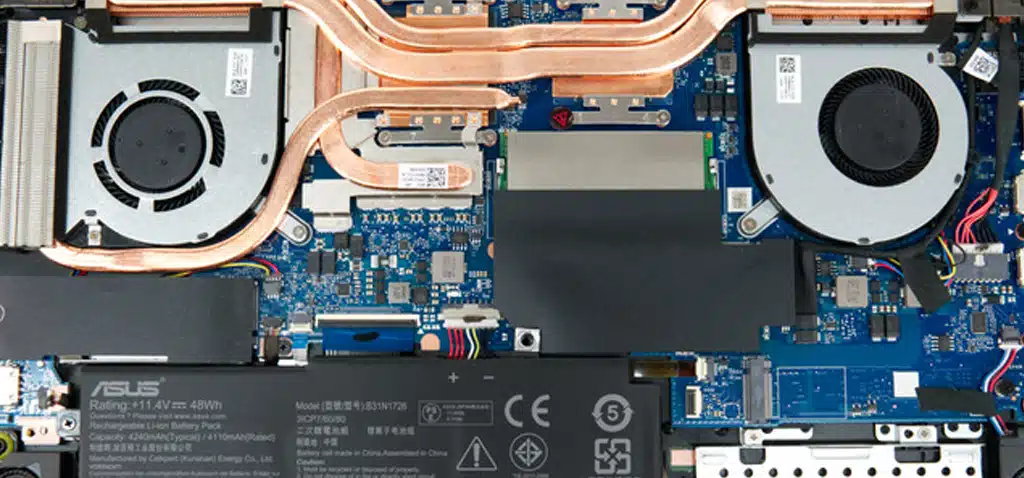
Asus ROG Motherboard Repair
By Bilal / ASUS ROG / 0 Comments

Asus ROG laptops are some of the best gaming laptops in the market, with high-performance components that ensure smooth gameplay. However, like all electronic devices, they can develop issues over time, and the motherboard is one of the critical components that can cause problems. Motherboard issues can be challenging to diagnose and fix, but we can restore your Asus ROG laptop to its former glory.

Here are some signs and symptoms that could indicate a problem with your Asus ROG Motherboard:

System Failure to Boot: If your Asus ROG motherboard fails, it could indicate a hardware problem. Check to ensure that all the components are correctly connected and that they are receiving power.

Overheating: If your computer is overheating, it could indicate that your motherboard is malfunctioning. You can check your motherboard’s temperature by using temperature monitoring software. If the temperature exceeds the recommended threshold, it’s time to audit the cooling system and ensure that the thermal paste is applied correctly.

Random Restart: If your computer restarts without warning, it could be an indication that there is a problem with the motherboard. Check to ensure that all the components are correctly connected and that they are receiving power.

Blue Screen of Death (BSOD): If your computer suddenly displays the blue screen of death, it could be a sign of a problem with your motherboard. Ensure that all the drivers are up-to-date and there are no conflicts between the software and hardware.

Strange Noises: If your computer makes unusual noises, it could indicate a problem with the motherboard’s power supply unit (PSU). Check the PSU for any damage or wear and tear.

USB Ports Not Working: If your computer’s USB ports stop working, it could be a sign of a problem with your motherboard. Check to ensure that the USB drivers are up-to-date and the ports are clean.

RAM Issues: If you experience frequent memory-related issues, such as blue screens or random restarts, it could be a sign of a problem with your motherboard’s RAM slots. Ensure that the RAM is correctly installed and that the slots have no dust or dirt buildup.

You must immediately seek professional assistance from PC FIX London if you encounter any problems. Contact us!

There are several common causes of Asus ROG laptop motherboard issues, including:

Overheating is among the most common causes of Asus ROG laptop motherboard issues. If your laptop’s cooling system is not working correctly, it can cause the motherboard to overheat, damaging the components and resulting in system failure.

Power Surges: Power surges can cause significant damage to your Asus ROG laptop motherboard. A sudden increase in voltage can fry the motherboard’s components, including the processor and RAM, causing irreversible damage.

Physical Damage: Drops, impacts, and spills can cause physical damage to your laptop’s motherboard. Even minor effects can cause components to loosen or dislodge, resulting in system failure.

Outdated or Corrupt BIOS: An obsolete or corrupted BIOS can cause issues with your Asus ROG laptop motherboard, including system instability, failure to boot, and random restarts. It’s essential to keep the BIOS up-to-date and ensure it’s correctly configured.

Power Supply Issues: Power supply issues can cause significant problems with your laptop’s motherboard. A faulty power supply can result in inadequate power delivery, which can damage the components and cause a system failure.

Software Conflicts: Software conflicts can cause issues with your Asus ROG laptop motherboard, including blue screens of death, random restarts, and system instability. It’s essential to keep your software up-to-date and ensure no conflicts between programs.

If you experience any of these issues with your Asus ROG laptop motherboard, you must take immediate action to prevent further damage and seek professional assistance.

To take care of your ASUS ROG Motherboard and avoid frequent repairs, here are some tips:

Keep the motherboard clean: Regularly clean your motherboard to prevent dust and debris buildup, which can cause overheating and damage to the components. Use compressed air or a soft brush to remove dust or dirt accumulating on the motherboard.

Proper cooling: Ensure that your cooling system works correctly and that the thermal paste is applied correctly. Overheating can damage the motherboard’s components and cause a system failure.

Regular updates: Keep your motherboard’s BIOS and drivers up-to-date to ensure optimal performance and compatibility with your hardware and software.

Use quality components: Use components compatible with your motherboard, such as RAM and power supply units (PSUs). Poor-quality components can cause system instability and damage to the motherboard.

Proper handling: Handle your motherboard with care to avoid physical damage. Avoid dropping, impacting, or applying too much pressure on the motherboard.

Power supply: Use a high-quality power supply unit (PSU) compatible with your motherboard to avoid power supply issues that can cause a system failure.

Regular maintenance: Perform routine maintenance, such as disk cleanup and virus scanning, to ensure optimal performance and prevent software conflicts that can cause system instability.

Following these tips, you can take care of your ASUS ROG motherboard and avoid frequent repairs. It’s essential to take immediate action if you experience issues with your motherboard to prevent further damage and seek professional assistance.

ASUS ROG Motherboard Issue: Why PC Fix London?

If you are experiencing issues with your ASUS ROG motherboard, PC Fix London could be an excellent choice for professional assistance for several reasons:

Experienced Technicians: PC Fix London has a team of experienced and certified technicians with the expertise and knowledge to diagnose and fix various issues with ASUS ROG motherboards.

Fast and Efficient Service: PC Fix London offers fast and efficient services to ensure your ASUS ROG motherboard is up and running as quickly as possible.

Competitive Pricing: PC Fix London offers competitive pricing for ASUS ROG motherboard repair services, ensuring you get quality services without breaking the bank.

High-Quality Parts: PC Fix London uses high-quality parts for ASUS ROG motherboard repairs, ensuring that your motherboard performs optimally and has a long lifespan.

Excellent Customer Service: PC Fix London provides excellent customer service and support, ensuring all your concerns are addressed promptly and satisfactorily.

Convenient Location: PC Fix London is conveniently located in the heart of London, making it easily accessible to customers.

Overall, PC Fix London is an excellent choice for ASUS ROG motherboard repair services, providing fast, efficient, and reliable services at competitive prices backed by excellent customer support.

If you’re experiencing issues with your Asus ROG motherboard or any other laptop-related problem, you can seek professional help from PC Fix London. Our experienced technicians provide fast and reliable repair services for all types of laptops, including the Asus ROG series. Contact us today at 020 7018 7490 or email us at contact@pcfixlondon.com to schedule a repair appointment or request a quote. Let us help you get your laptop back in top working condition.

Warning: The information provided will help you understand the signs of Asus ROG motherboard issues & how to take care of it. It is not intended to encourage or guide you to attempt any repairs independently. Always seek professional assistance from a certified technician from PC Fix London to avoid causing further damage to your device.