
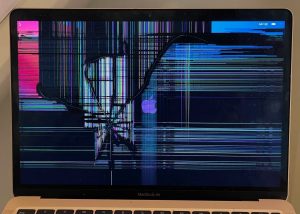
PC Fix London can fix your MacBook Air’s cracked screen. You can count on our knowledgeable technicians for quick and trustworthy repair services for your device. A ruined MacBook Air screen can be a real pain, we know. If you’re dealing with a broken display or an LCD that’s not working, our skilled team is prepared to give you high-quality, fast repairs. We have one goal to get your MacBook Air working perfectly again.
Common Causes of MacBook Air Screen Issues
Let’s dive into why MacBook Air screens act up so you can spot it when it happens.
- Physical Damage: If you drop it or something hits the screen, the glass might break.
- Liquid Damage: If something spills or gets wet, it could mess up the screen’s LCD or rust over time.
- Manufacturing Defects: Occasionally, manufacturing defects or component failures can manifest as screen issues.
- Age and Wear: Screens can worsen over the years due to regular use, which can cause blinking, darkening, or color changes.
Models We Cover:
- MacBook Air 11-inch:
- Mid-2011 (A1370)
- Mid 2012 (A1465)
- Mid 2013 (A1465)
- Early 2014 (A1465)
- Early 2015 (A1465)
- MacBook Air 13-inch:
- Late 2010 (A1369)
- Mid-2011 (A1369)
- Mid 2012 (A1466)
- Mid 2013 (A1466)
- Early 2014 (A1466)
- Early 2015 (A1466)
- 2017 (A1466)
- Retina Display models (2018, 2019, 2020, 2021, 2022, 2023)
Our Repair Process
- Diagnosis: When you bring your MacBook Air with a broken screen, we’ll examine it carefully. Our specialists take a detailed look to see how bad the crack is.
- Estimate: Following the check-up, we present an exact repair bill. It includes all costs and how long we’ll need to fix your MacBook Air.
- Repair: If you say go ahead, we will start repairing. We use genuine Apple parts to ensure your MacBook Air works like new.
- Testing: After fixing it, we will test every function of your MacBook Air. We want to make sure it’s working just like it should!
- Quality Check: A final check-up happens before we say it’s all done. We want to make sure the repair meets our high-quality standards!
How to Avoid a Broken MacBook Air Screen
Your MacBook Air’s screen is fragile and important. A damaged screen can mess up your work and lead to expensive fixes. Luckily, there are ways you can guard your MacBook Air’s screen against harm. Stick to these suggestions to keep your gadget’s display secure and flawless.
- Get a Safe Case: Buying a high-grade, well-fitting case is key to safeguarding your MacBook Air from sudden falls and hits. Look for a case with soft padding and a hard shell for top-level defense.
- Apply a Screen Protector: Stick on a screen shield to keep off scratches, fingerprints, and light impacts. Make sure you fit it without any tiny air pockets and it aligns perfectly with your screen.
- Avoid Overstuffing Your Bag: Avoid cramming your bag with too many items when carrying your MacBook Air. Too much pressure might shatter the screen. A special laptop pocket in your bag can offer extra safety.
- Be Gentle: Don’t close your MacBook Air too roughly or push too hard on the lid. Never pick up or move the laptop by the screen as it can put too much strain on the hinges and screen.
- Keep Away from Food and Drinks: It’s best to keep your MacBook Air away from food and drinks so as to avoid any chance of spills or crumbs damaging the screen. If you must have a drink nearby, use a no-spill cup.
- Clean the Screen Right: Wipe the screen now and then with a soft, no-lint cloth and proper screen cleaner. Don’t press too hard when cleaning to prevent harming the display.
- Beware of Pets and Young Children: Keep your MacBook Air out of reach of pets and young ones who might accidentally knock it over or scrape the screen. Use a solid, stable platform for your laptop to lessen risks.
- Close the Lid When Not in Use: Close the lid when the MacBook Air isn’t in use to guard the screen from accidental bumps or falling items. Activate sleep mode to avoid regular power cycles, which can harm hardware.
These steps can highly cut down the risk of breaking your MacBook Air screen and help you keep your device in great shape for a long time.
Why Choose PC Fix London?
- Expert Technicians: We boast a team of technicians who have been fixing MacBooks for years.
- Quality Parts: Every part we replace is premium-grade to give you the best performance and lifespan.
- Quick Turnaround: Our mission? Fast repairs, but not for the sake of quality.
Conclusion
In short, do not let a damaged screen hinder your MacBook Air usage. Choose PC Fix London for swift, trustworthy, and reasonably priced repair services. Contact us now for your MacBook Air screen fix and notice our pro service difference.
- Location: Sinclair House, Thanet St, Kings Cross, London WC1H 9PZ
- Phone: 020 7018 7490
- Mail: contact@pcfixlondon.com