
MacBook Air Battery Replacement in London – Keep It Light, Keep It Running
Your MacBook Air is meant to look good, work fast, and stick around for a while. If you notice that your battery is dying quicker than you can enjoy your coffee, it might be time to consider getting a new one. At PC Fix London, we offer reliable MacBook Air battery replacement services that’ll get your Mac back up and running smoothly, all without any stress. Whether you’re using an older Intel model or the newest M1 or M2, we’ve got your back for a smooth and safe battery replacement. Just swing by, drop it off, and we’ll take care of everything else for you.
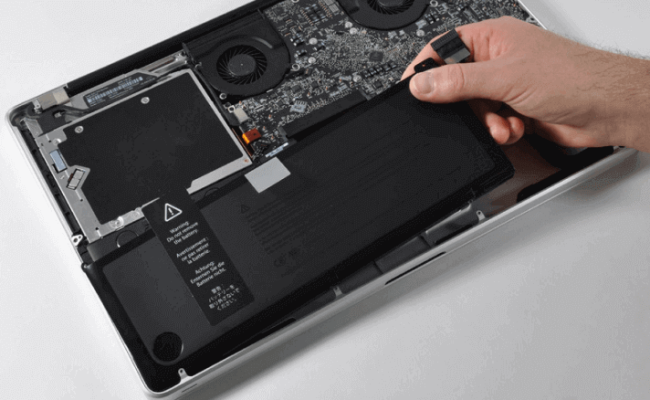
When Should You Replace Your MacBook Air Battery?
If you notice any of these signs with your MacBook Air’s battery, it might be time to take a closer look:
- It shuts down even when the battery says there’s still 20-30% left.
- The battery is draining super-fast or just won’t hold a charge anymore.
- Your Mac only works when it’s plugged into the wall.
- You see messages like “Service Battery” or “Battery Condition: Replace Soon” in your settings.
- The battery is swollen, making the trackpad or the case look weird.
- macOS takes forever to start up or dies when it goes to sleep.
If your Air is acting like this, come on in—we can check it out and see if you need a battery replacement.
Models We Support
Hey there! We can swap out batteries for all MacBook Air models, which includes:
- MacBook Air 11” & 13” from 2011 to 2017
- MacBook Air Retina from 2018 to 2020
- MacBook Air with the M1 chip from 2020 to 2021
- MacBook Air with the M2 chip from 2022 to 2024
Not sure which model you have? No worries! Just bring it by, and we’ll help you figure it out and check if the battery works for your laptop right then and there.
What We Do – Step by Step
We make sure everything runs smoothly and safely at every step:
- Battery Check-Up: We take a look at the battery cycle count, capacity, and how well it’s working.
- Battery Replacement Done Right: We use real Apple batteries and handle the swap carefully to prevent any damage inside.
- Testing After Replacement: We do some calibration and power checks to make sure everything’s is working just right.
- Clean-Up & Fast Service: While we’re at it, we’ll clean out any dust and get your Mac back to you looking good as new.
Why Londoners Choose PC Fix London
We’re not your typical repair shop, and here’s why we’re special:
- Original Batteries Only – We use only the best batteries for quality and your peace of mind.
- Trained Apple Repair Techs – Our team knows their stuff and has the right tools to get the job done.
- Quick Turnaround – Most repairs are wrapped up the same day, but subject to parts availability.
- No Fix, No Fee – If we can’t fix it, you won’t pay a dime.
- Centrally Located in King’s Cross – Super easy to get to from anywhere in London.
- Collection & Drop-Off Service – We’ll pick up your MacBook and bring it back when it’s ready.
- No Appointment Required – Just swing by whenever it works for you!
Bonus: Free Health Check with Every Battery Swap
While we’re changing out your battery, we’re also happy to check your device for free to ensure everything’s running smoothly.
- Your charging port is clean and working well.
- The fans are working just fine and aren’t too noisy at all.
- The software isn’t using up power for no reason.
- Your macOS is up-to-date and running stable.
When you leave, you’ll have a new battery and a Mac that’s feeling much better!
Want to Know the Cost?
The cost of replacing a battery can vary a bit depending on your model and what we have available at the moment. But here’s a general idea of what you can count on:
- Clear pricing before we start
- No surprise charges
- A real Apple battery with a warranty
- Our “No Fix, No Fee” promise
If you want a quick quote, just give us a call or swing by with your MacBook Air. We’ll fill you in on all the details!
How to Get Started
Walk-In Repairs:
You can swing by PC Fix London at Sinclair House, Thanet Street, King’s Cross, WC1H 9P.
Book Collection & Delivery:
Too busy to drop by? No worries! Just let us know, and we’ll come grab your MacBook, sort out that battery issue, and bring it back to you in one piece.
Talk to Us:
Give us a ring at 020 7018 7490 or shoot us an email at contact@pcfixlondon.com!
MacBook Air Battery Replacement FAQs
Q: Can I still use my Mac if the battery’s no good?
Ans: Yeah, you can, but it might wear out more or shut down unexpectedly. It’s better to get it replaced sooner rather than later.
Q: How long does it take to replace the battery?
Ans: Usually, we can get it done the same day, but it depends on what we have in stock. We’ll let you know when you bring it in.
Q: Do you replace batteries in M1 and M2 models?
Ans: Yep! We take care of battery replacements for those Apple Silicon models with the right original parts.
Q: Will I lose my files if I get the battery replaced?
Ans: Nope, you won’t lose any of your data. Changing the battery doesn’t touch your storage or files.
Q: Can I just buy a battery and swap it out myself?
Ans: You could, but it’s a bit risky. MacBooks are pretty packed inside, and it’s easy to mess something up. Better to leave it to the professionals!
Power Up with a New Battery Today
Don’t let a dead battery slow you down! At PC Fix London, we can swap out your MacBook Air battery fast and safely. You’ll be back to work, school, or binge-watching Netflix in no time.
Give us a ring at 020 7018 7490, shoot us an email at contact@pcfixlondon.com, or just drop by Sinclair House in King’s Cross.
Your MacBook Air deserves a better battery, and so do you!